

Intro
I started building PIM Manager because Microsoft’s PIM lacks critical visibility. No dashboard, no single view, just individual blades.
That’s not a minor inconvenience. It’s a security risk. If you can’t see what’s configured, you can’t secure it properly.
When I started building, it became a learning experience. About PIM itself: how policies actually work, what the Graph API exposes, where the gaps are.
About building a tool like this: progressive loading, delta queries, worker pools.
I learned by doing.
I planned to build the Configure page next. But I realized: I couldn’t build a reliable wizard without first understanding PIM for Groups. If Groups use different APIs and policy structures, I’d end up building a Configure page that only works for Roles. Then I’d have to rebuild it all. So I made a decision: understand Groups first, build Configure second.
Turns out, that was the right call. Groups are fundamentally different with separate Owner and Member policies, different endpoints, and different permissions.
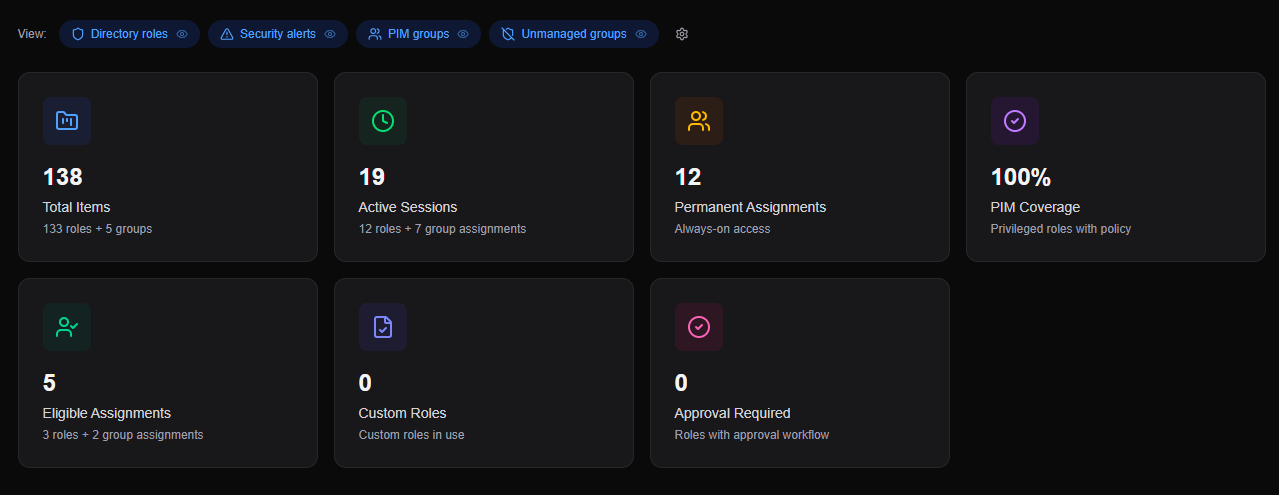
This blog covers what changed in this journey: PIM for Groups support, unmanaged groups discovery, workload toggles, smarter data syncing, flexible PDF exports, and runtime debugging tools.
PIM for Groups: Two policies, not one
Why this mattered
PIM for Groups isn’t just “roles but for groups.” It’s structurally different.
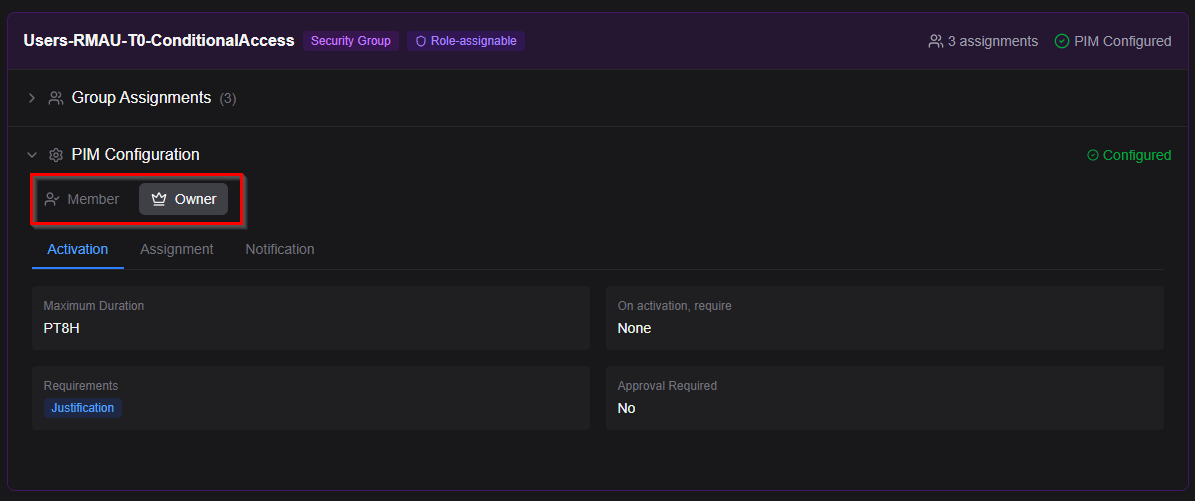
With a Directory Role, you have Eligible or Active assignments. Simple. With a Group, you have Owners and Members. Each has its own policy. Different activation duration. Different MFA requirements. Different approval workflows.
In the portal, that means separate tabs for “Owner settings” and “Member settings.” If PIM Manager treats Groups as flat entities (just showing assignments without the Owner/Member split), it’s not useful for audits.
How it works technically: When you assign a role to a PIM-managed group, that role assignment is always active. The PIM layer sits at the group membership level, not the role assignment. Users activate into the group (as Member or Owner), and once they’re in, they get the roles assigned to that group. This is why you need separate policies for Owners and Members: they might need different activation requirements even though they’re accessing the same downstream roles.
Breaking it down
UI: GroupCard component with separate tabs for Member and Owner settings. Policy sections (activation, assignment, notifications) are mirrored for both. Assignment lists filter by role type.
Data structure: Each group stores two policy objects, one for Members and one for Owners. When you expand a group in the Report page, you see both policies side-by-side.
Graph API: Groups use the same endpoint as Roles (roleManagementPolicyAssignments), with a scopeType='Group' filter. The API returns separate policies for Members and Owners based on the roleDefinitionId.
If you’re using PIM for Groups for scoped privileged access (like “Helpdesk Operator for OU Amsterdam”), you need to see that Owners have a 4-hour max activation and Members have 8 hours. Or that approval is required for Owners but not Members. Without this, you’re missing half your security posture.
Unmanaged Groups: The security gap you didn’t see
When you start using PIM for Groups, there’s a risk most people don’t think about.
Role-assignable groups can exist in your tenant without being PIM-managed. They have isRoleAssignable: true , but no PIM policy attached. That means they have role assignment capability, but aren’t managed by PIM. No time-bound activations. No MFA requirements. No approval workflow. Just direct, permanent group membership.
These groups don’t show up in the PIM blade. But they’re fully functional for privileged access.
The risk: If you assume “all privileged access goes through PIM,” but you have unmanaged groups, that assumption is wrong. You have a blind spot.
Detection and visibility
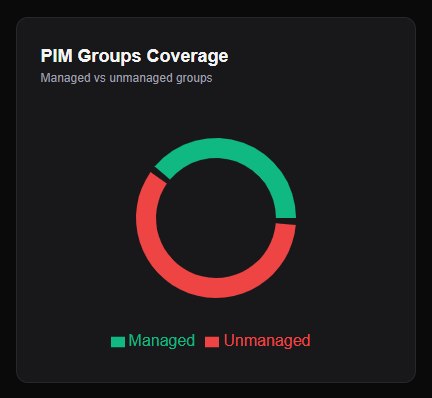
Simple logic: if a group can assign roles but has no PIM policy, it’s unmanaged.
Unmanaged Groups chart: Shows the split between Managed and Unmanaged groups on the dashboard. Clickable, like all dashboard charts. Filters the report view when you click it.
Workload visibility: On the Dashboard, the “Unmanaged Groups” toggle only appears if you’ve consented to PIM for Groups. On the Report page, it’s an independent toggle; sometimes you want to see everything.
Export: CSV export includes a “Managed” column (Yes/No). Filter in Excel to see only unmanaged groups.
You run a PIM audit. You see 50 groups. You assume they’re all PIM-managed. But some aren’t. That gap used to be invisible. Now it’s front and center.
Workload Toggles: Multi-workload architecture
Version 1.0 was single-workload: Directory Roles only. When PIM for Groups landed, state management became complex. Each page had its own logic. Filters broke between pages. Consent handling was inconsistent. That approach wouldn’t scale.
The solution: UnifiedPimContext
Central state management for all workloads. Directory Roles, PIM for Groups, Unmanaged Groups, and future developments all managed in one place.
Each workload has:
Consent state (did the user grant permissions?)
Loading state (is data currently being fetched?)
Data (the actual roles or groups)
Visibility (is the user showing or hiding this workload?)
Incremental Consent: You open the app, and it asks for Directory Roles permissions. You toggle on PIM for Groups, and you get a consent pop-up for the Groups scope. No need to re-consent for everything upfront.
Workload Visibility controls:
Dashboard: Toggles affect all components (charts, cards, lists)
Report page: Independent toggles (you might want to see only Groups)
Settings Modal: Central configuration point
If you have 200 Directory Roles and 50 PIM for Groups, you don’t always want both visible. Toggle the workload, and your charts and exports contain only what you need.

And if you don't have Groups permissions yet? The UI still works. No errors. No broken features.
Smart Sync: But not quite
Here’s where I want to talk about something that almost works.
Here’s the thing: I didn’t know delta queries existed until I started building PIM for Groups support. I was fetching everything on every refresh, thousands of API calls, and rate limits everywhere. Then I found the delta endpoint in the Microsoft Graph docs and realized: this is exactly what I needed.
Microsoft Graph supports delta queries. You make an initial request, get back a full dataset plus a deltaLink. Next time, you use that deltaLink and only get what changed since the last request. It’s very efficient.
Example: Initial request to /users/delta returns:
{
  “@odata.nextLink”: “https://graph.microsoft.com/v1.0/users/delta?$skiptoken=...”,
  “value”: [ /* all users */ ]
}
When you've retrieved all pages, the final response contains:
{
  “@odata.deltaLink”: “https://graph.microsoft.com/v1.0/users/delta?$deltatoken=abc123...”,
  “value”: [ /* last batch of users */ ]
}
Next refresh? Use that @odata.deltaLink. Graph returns only what changed (new, updated, deleted). If nothing changed, you get an empty array and a new deltaLink.
I implemented this for role and group assignments. If you refresh and nothing changed, the app makes ~10 API calls instead of 500. Big performance improvement.
But here’s the catch: Delta queries don’t work for role or group configuration (the policies). There’s no delta endpoint for RoleManagementPolicy. Every time you refresh, you have to re-fetch all policies, one by one.
Still, delta queries help with the bulk of the data: roles, groups, and assignments. The app uses them where it can.
For policies, I built a worker pool to fetch them in parallel without hitting rate limits. Not as elegant as delta queries, but it works.
Why mention this? Because understanding the limitations is part of the story. Delta queries exist. They’re powerful. But they’re not a universal solution.
You have to know where they apply and where they don’t.
PDF Export: Config-driven and flexible
Why this mattered
The first version had PDF export, but it was hardcoded. Fixed sections, no filtering. And you asked for visual stat cards alongside the data.
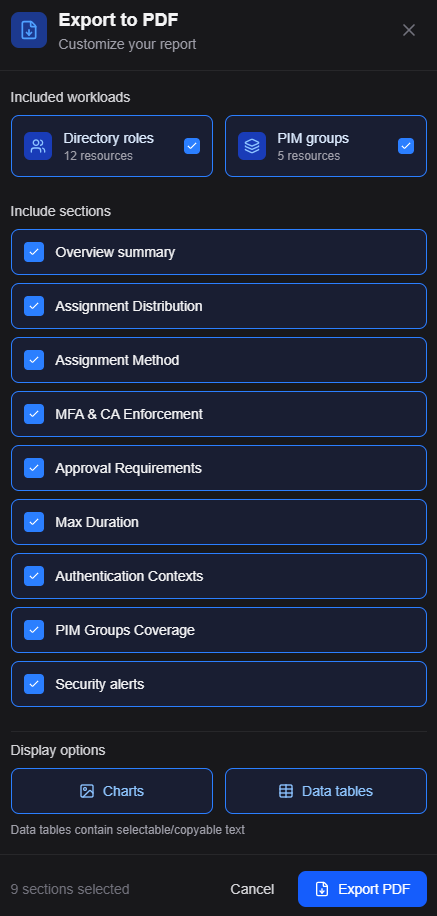
Now it’s there. Config-driven sections, workload filtering, stat cards with colored accents.
When you export, choose which sections to include. Want assignments but not policies? Select assignments. Want only PIM for Groups data? Toggle off Directory Roles first, then export.
Debug without rebuilding: Runtime logger
I needed better debugging. When something breaks or doesn’t load, I need to see the consent state, API calls, and workload initialization without rebuilding the app.
Runtime logger has two levels: INFO (default) and DEBUG.
Switch modes in Settings → Developer tab, which includes instructions on viewing console logs and using DEBUG mode.
💡 Note: DEBUG slows page loads (intentional, it’s for troubleshooting).
Where we are now
PIM Manager is still a reporting and visibility tool. That’s what it does well. You get insight into your PIM configuration (Directory Roles and PIM for Groups) without clicking through the portal for hours.
What’s working:
Directory Roles and PIM for Groups reporting (Owner/Member policies)
Security gap detection (unmanaged groups)
Workload isolation (toggle visibility)
Efficient data sync (delta queries where supported)
Flexible exports (choose sections, filter workloads)
Runtime debugging (enable logging without rebuilding)
Limitations:
Read-only (for now). The tool shows you what’s configured, but doesn’t change policies. The Configure wizard will add that capability.
Cloud-hosted only. You can’t self-host yet. Everything runs in your browser, talking directly to Microsoft Graph (no data leaves your session), but the app
is hosted on Cloudflare Pages. I’m exploring self-hosting options. Let me know
your preferences.
Session cache. Data refreshes when you tell it to, not automatically. It’s not live monitoring. When you close the app, cache and localStorage are cleared for security.
Manual consent. You need to enable each workload yourself. No admin pre-consent for all users.
The Configure wizard is coming. It'll let you bulk-apply policies, clone settings, and review diffs before making changes. But that's focused, careful work, which takes some time. One feature at a time.
Open Source & Documentation
By popular request, I’ve made the repository public, including the full architectural documentation.
Want to deep-dive into the data flow, security model, or see exactly which Graph API endpoints are used? It’s all documented there.
⚙️PIM Manager repository
Thanks for taking the time to read this! Got feedback or suggestions? Let me know.